
How hooks work
Introduction
Hooks were introduced in React v16.8.0, and since then they changed the way React apps were written. Before them, we used to create class component for anything involving state or lifecycle logic. Hooks made function component the new defacto of writing react apps.
They were a huge addition that simplified a lot of things. I am not stating here
that they are better than class components, but they offer a simpler way
to reason about components and to deal with them, and especially they allow
escaping dealing with this.
This is not an explanation of React hooks themselves as they are pretty well documented in the official documentation. We will see how they are written into React.
Context
In the previous sections, precisely in how function components get rendered;
we've seen that we set a Dispatcher based on whether your component is
mounting for the first time or updating. So first, let's demystify this
dispatcher.
ReactCurrentDispatcher
in the renderWithHooks
function, we set the ReactCurrentDispatcher.current. Which is a plain
javascript object with all the hooks implementations that React has.
The goal of having the dispatcher object is to limit the behavior of your hooks' usage:
- You cannot use hooks outside the render phase: This means that hooks won't work if you just decide to call the function component manually when React isn't rendering. You are probably familiar with the thrown error.
- Hooks behavior on mount and update isn't the same: as we will see later in
this section, on mount, the main goal of the dispatcher is to
reserveas place for your hook call and initialize it, but on update it will perform the update logic which is different.
Like we said, the dispatcher contains as many properties as React hooks:
export const AllDispatchers: Dispatcher = {
  readContext,

  use,
  useCallback: hook,
  useContext: hook,
  useEffect: hook,
  useImperativeHandle: hook,
  useInsertionEffect: hook,
  useLayoutEffect: hook,
  useMemo: hook,
  useReducer: hook,
  useRef: hook,
  useState: hook,
  useDebugValue: hook,
  useDeferredValue: hook,
  useTransition: hook,
  useSyncExternalStore: hook,
  useId: hook,
};
There are several dispatchers, but we will only discuss the main four:
ContextOnlyDispatcher: This dispatcher will prevent you from using hooks outside the render phase. It will throw the famousInvalid hook callerror.HooksDispatcherOnMount: This dispatcher contains hooks implementation for components when mounting for the first time.HooksDispatcherOnUpdate: This dispatcher contains hooks implementation for components when they are updating.HooksDispatcherOnRerender: This dispatcher contains hooks implementation when components are re-rendering: when they perform a render phase update or when they rendered twice in dev mode.
How hooks are modelled
Each function component may have calls for any of the supported hooks. Remember,
all hooks calls occur withing the renderWithHooks function (exception for
the hooks for re-renders, they are called from within the renderWithHooksAgain
function).
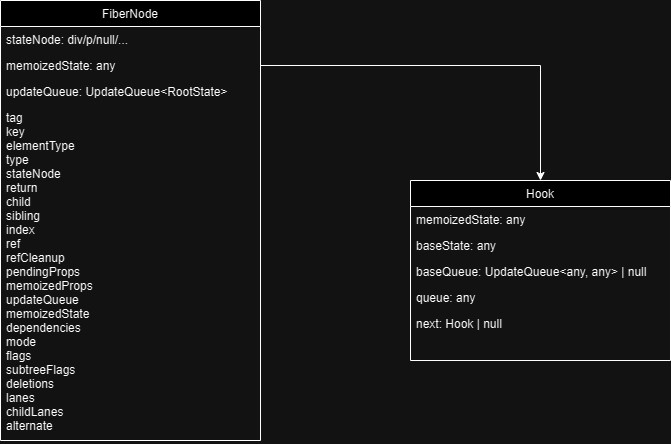
Hooks are store into the memoizedState property of the related Fiber.
A hook is stored inside React as a plain object with the following properties:
const hook: Hook = {
  memoizedState: null,

  baseState: null,
  baseQueue: null,
  queue: null,

  next: null,
};
Where:
memoizedState: contains the hook "state" (or value)baseState: used by state hooks to store the initial valuebaseQueue:queue: the UpdateQueue object used by state hooks to store many thingsnext: the next hook.
As you may have guessed, the next property references in the next hook your
component uses. Thus, hooks are modelled as a linked list of the previous
data structure.
Each hook have its own specification when it comes to what it stores inside these properties, some hooks don't use all of these properties, obviously.
Notice how this data structure doesn't contain any information about the hook being used, hooks relies on call order and should ALWAYS be preserved.
Dan Abramov wrote an outstanding blog post explaining this design choice.
Hooks examples
Assuming we are rendering the following component:
function MyFunctionComponent(props) {
  const [count, setCount] = React.useState(0);
  // please don't do this, this is only for demo purposes
  const isMounted = React.useRef(false);
  // please don't do this, this is only for demo purposes
  const mountDate = React.useMemo(() => Date.now(), []);

  React.useEffect(() => {
    function handler() {
      console.log('window is focused')
    }

    window.addEventListener("focus", handler);
    return () => window.removeEventListener("focus", handler);
  }, []);

  return <span>Count is {count}</span>
}
Rendering this component will result in having a Fiber of tag
FunctionComponent with the following hooks linked list:
let memoizedState = {
  // useState
  "memoizedState": 0,
  "baseState": 0,
  "baseQueue": null,
  "queue": {
    "pending": null,
    "lanes": 0,
    "lastRenderedState": 0
  },
  "next": {
    // useRef
    "memoizedState": {
      "current": false
    },
    "baseState": null,
    "baseQueue": null,
    "queue": null,
    "next": {
      // useMemo
      "memoizedState": [
        1700218172414,
        []
      ],
      "baseState": null,
      "baseQueue": null,
      "queue": null,
      "next": {
        // useEffect
        "memoizedState": {
          "tag": 9,
          "inst": {},
          "deps": [],
          "next": "the same effect .. removed for clarity"
        },
        "baseState": null,
        "baseQueue": null,
        "queue": null,
        "next": null
      }
    }
  }
}
How hooks on mount work
The purpose on hooks on mount as stated before is to grab a place in the linked list of the hooks.
So, all hooks implementations on mount will first perform the following:
const hook = mountWorkInProgressHook();
The mountWorkInProgressHook function will create the previous data structure
and then set is as the memoizedState property of the currentlyRenderingFiber.
mountWorkInProgressHook Implementation
The mount in progress hook function is implemented as follows:
function mountWorkInProgressHook(): Hook {
  const hook: Hook = {
    memoizedState: null,

    baseState: null,
    baseQueue: null,
    queue: null,

    next: null,
  };

  if (workInProgressHook === null) {
    // This is the first hook in the list
    currentlyRenderingFiber.memoizedState = workInProgressHook = hook;
  } else {
    // Append to the end of the list
    workInProgressHook = workInProgressHook.next = hook;
  }
  return workInProgressHook;
}
- First, it will create the hook object
- Then, if it is the first hook of the list, it will attach it to the
memoizedStateof thecurrentlyRenderingFiberand set this hook at theworkInProgressHook - Or else, it will attach it to the
nextproperty of theworkInProgressHook.
And that's it!
Depending on the hook, other things will be performed, we will see them separately for each supported hook.
How hooks on update work
When your component is updating (not its first ever render), each supported hook call will start with the following expression then will follow up with the specific work.
const hook = updateWorkInProgressHook();
updateWorkInProgressHook
is a bit more complex than the mount one, but its purpose it to detect the next
workInProgressHook too. it used for both updates and re-renders, so it assumes
that there is either a current hook object that can be cloned or a
work-in-progress from a previous render that can be reused.
The first part of this function then is to find the currently rendered hook
value. It will check the current rendered fiber's memoizedState
property if the currentHook module variable is null, or else it takes its
next property:
// at module level:
let currentHook: null | Hook = null;

// inside updateWorkInProgressHook

let nextCurrentHook: null | Hook;
if (currentHook === null) {
  // the current rendered fiber
  const current = currentlyRenderingFiber.alternate;

  // already mounted
  if (current !== null) {
    nextCurrentHook = current.memoizedState;
  } else {
    // first mount
    nextCurrentHook = null;
  }

} else {
  nextCurrentHook = currentHook.next;
}
Now, after detecting the current rendered (painted) hook value, React will then try to find its alternate (the being rendered one):
// at module level:
let workInProgressHook: null | Hook = null;

// inside updateWorkInProgressHook
let nextWorkInProgressHook: null | Hook;

// first hook of the list, take it from the being rendered fiber
if (workInProgressHook === null) {
  nextWorkInProgressHook = currentlyRenderingFiber.memoizedState;
} else {
  // or else, it is the next hook
  nextWorkInProgressHook = workInProgressHook.next;
}
It is important to note that when we start updating a component, the memoized state property is reset and set to null.
Now, we have the currently painted hook value, and the being rendered one.
When there is a nextWorkInProgressHook, this means that we already have
started rendering then we are rendering again without committing and finishing
the render, and thus, we will reuse it as is:
if (nextWorkInProgressHook !== null) {
  // There's already a work-in-progress. Reuse it.
  workInProgressHook = nextWorkInProgressHook;
  nextWorkInProgressHook = workInProgressHook.next;

  currentHook = nextCurrentHook;
}
Or else, if the nextCurrentHook is null, that we are rendering more hooks
than the previous render, which is against hooks rules, and then React will
throw an error.
When nextCurrentHook isn't null, this means that we should clone the previous
hook and use it as a base:
// React code

if (nextWorkInProgressHook !== null) {
  // previous code
} else {
  if (nextCurrentHook === null) {
    const currentFiber = currentlyRenderingFiber.alternate;
    if (currentFiber === null) {
      // This is the initial render. This branch is reached when the component
      // suspends, resumes, then renders an additional hook.
      // Should never be reached because we should switch to the mount dispatcher first.
      throw new Error(
              'Update hook called on initial render. This is likely a bug in React. Please file an issue.',
      );
    } else {
      // This is an update. We should always have a current hook.
      throw new Error('Rendered more hooks than during the previous render.');
    }
  }

  currentHook = nextCurrentHook;

  // clone from the currently painted hook
  const newHook: Hook = {
    memoizedState: currentHook.memoizedState,

    baseState: currentHook.baseState,
    baseQueue: currentHook.baseQueue,
    queue: currentHook.queue,

    next: null,
  };

  if (workInProgressHook === null) {
    // This is the first hook in the list.
    currentlyRenderingFiber.memoizedState = workInProgressHook = newHook;
  } else {
    // Append to the end of the list.
    workInProgressHook = workInProgressHook.next = newHook;
  }
}
How hooks on rerender work
Re-rendering components is an internal term in the React codebase that means that the component either scheduled a render phase update or that we are replaying it in development mode.
If you take a close look at the HooksDispatcherOnRerender dispatcher, you will
notice that it is the same as the HooksDispatcherOnUpdate except for:
useReducer: rerenderReducer, useState: rerenderState,
useDeferredValue: rerenderDeferredValue and useTransition: rerenderTransition.
This dispatcher is set from the renderWithHooksAgain
function. I will just copy Andrew's comment about this function:
// This is used to perform another render pass. It's used when setState is
// called during render, and for double invoking components in Strict Mode
// during development.
//
// The state from the previous pass is reused whenever possible. So, state
// updates that were already processed are not processed again, and memoized
// functions (`useMemo`) are not invoked again.
//
// Keep rendering in a loop for as long as render phase updates continue to
// be scheduled. Use a counter to prevent infinite loops.
How each hook works
We will follow the presence of hooks in the dispatchers order to explain them.
How use works
The use hook is a new hook that will replace the throw promise pattern
introduced for suspending components that still wait for data.
Suspending using throw promise was there since too long, but was never
official, and this hook is introduced as a viable alternative.
Signature
The use hook is defined here.
function use<T>(usable: Usable<T>): T {
  // [Not Native Code]
}
It accepts either a promise or context type.
The use hook doesn't rely on mountWorkInProgressHook and updateWIPHook, so
it can be called conditionally and doesn't obey the rules of hooks.
Implementation
As stated before, use accepts thenabled and Context:
Context
When the provided object to use is a React Context, it will just delegate
the work to the readContext function. It will be discussed and explained
in the useContext section.
if (
  usable.$$typeof === REACT_CONTEXT_TYPE ||
  usable.$$typeof === REACT_SERVER_CONTEXT_TYPE
) {
  const context: ReactContext<T> = usable;
  return readContext(context);
}
So, use will allow you to conditionally subscribe to a context while escaping
the rules of hooks 🤯
Thenable
When a thenable object is provided, React will call the internal useThenable
function:
function use<T>(usable: Usable<T>): T {
  if (usable !== null && typeof usable === 'object') {
    if (typeof usable.then === 'function') {
      const thenable: Thenable<T> = usable;
      return useThenable(thenable);
    }
    // ... other code
  }

  throw new Error('An unsupported type was passed to use(): ' + String(usable));
}
We've reached a point where the useThenable function is clearly behind
the use hook's work:
Besides of initializing and incrementing the thenable state (which I will not
explain now), useThenable calls trackUsedThenable
which will do the whole work.
function useThenable<T>(thenable: Thenable<T>): T {
  // Track the position of the thenable within this fiber.
  const index = thenableIndexCounter;
  thenableIndexCounter += 1;
  if (thenableState === null) {
    // createThenableState returns a plain javascript array
    thenableState = createThenableState();
  }
  const result = trackUsedThenable(thenableState, thenable, index);
  // ... other code
  return result;
}
Let's then dive into trackUsedThenable:
Part 1: Add the thenable to the array of thenables:
Please pay attention to Sophie's comment: if the there was a thenable at the same position, we will reuse the former one because they should technically point to the same value. Don't ask me of this design choice.
const previous = thenableState[index];
  if (previous === undefined) {
    thenableState.push(thenable);
  } else {
    if (previous !== thenable) {
      // Reuse the previous thenable, and drop the new one. We can assume
      // they represent the same value, because components are idempotent.

      // Avoid an unhandled rejection errors for the Promises that we'll
      // intentionally ignore.
      thenable.then(noop, noop);
      thenable = previous;
    }
  }
Part 2: Track the thenable There are two cases, whether we previously tracked this thenable, or it is the first time we encounter it.
Tracking the thenable is adding a
then(onFullfilement, onRejection)callbacks that will mutate the thenable itself:Read well the following code and grasp it:
const pendingThenable: PendingThenable<T> = thenable;
pendingThenable.status = 'pending';
pendingThenable.then(
  fulfilledValue => {
    if (thenable.status === 'pending') {
      const fulfilledThenable: FulfilledThenable<T> = thenable;
      fulfilledThenable.status = 'fulfilled';
      fulfilledThenable.value = fulfilledValue;
    }
  },
  (error: mixed) => {
    if (thenable.status === 'pending') {
      const rejectedThenable: RejectedThenable<T> = thenable;
      rejectedThenable.status = 'rejected';
      rejectedThenable.reason = error;
    }
  },
);
But before tracking like this, if the thenable was already tracked, we only verify its status:
switch (thenable.status) {
  case 'fulfilled': {
    const fulfilledValue: T = thenable.value;
    return fulfilledValue;
  }
  case 'rejected': {
    const rejectedError = thenable.reason;
    checkIfUseWrappedInAsyncCatch(rejectedError);
    throw rejectedError;
  }
  // ... other code
}- When status is
fulfilled, theusehook will return the value - When status is
rejected, theusehook will throw the error
When the status is
pending, React will throw a special exception object calledSuspenseExceptionto suspend the tree until the thenable resolves or rejects.This will lead to the component rendering only if it has data, and throwing in the other cases.
noteThe use hook will require you to put an Error boundary in the tree to intercept rejections.
- When status is
The use hook will require you to manually cache/memoize the promises.
The React.cache experimental API is designed to help you with that.
Examples
Let's say we want to get the user details from the public jsonplaceholder API.
To achieve that, we will create a small cache to help us memoizing the promises and thus avoid infinite renders. So, let's create a dumb memoizer for functions:
// we assume that we will cache with one parameter
// which will be the user id.
// React.cache is a general solution for this.
// for clarity, we'll use only userId
function createCache(asyncFunc) {
  let cache = {};

  return function exec(...args) {
    let cacheId = args[0];
    let existing = cache[cacheId];
    if (existing) {
      return existing;
    }

    let result = asyncFunc.apply(null, args);
    cache[cacheId] = result;
    return result;
  };
}
Let's then create a dumb error boundary for that too:
class ErrorBoundary extends React.Component {
  state = { error: null };
  componentDidCatch(error) {
    this.setState((prev) => ({ ...prev, error }));
  }
  render() {
    const { error } = this.state;
    if (error) {
      return (
        <>
          <pre>{error.toString()}</pre>
          <button
            onClick={() => this.setState((prev) => ({ ...prev, error: null }))}
          >
            Reset
          </button>
        </>
      );
    }
    return this.props.children;
  }
}
And finally, let's exploit this code:
async function fetchUserById(userId) {
  let result = await axios.get(
    `https://jsonplaceholder.typicode.com/users/${userId}`
  );
  return result.data;
}

let getUserDetails = createCache(fetchUserById);

let IDS = [1, 2, 3, 4, 5, 10, 11];

function UserDetails({ id }) {
  let details = React.use(getUserDetails(id));

  return (
    <details open>
      <pre>{JSON.stringify(details, null, 4)}</pre>
    </details>
  );
}
function Example() {
  let [userId, setUserId] = React.useState(IDS[0]);
  return (
    <div className="App">
      {IDS.map((id) => (
        <button
          onClick={() => {
            setUserId(id);
          }}
          key={id}
        >
          {`User ${id}`}
        </button>
      ))}
      <React.Suspense fallback={`Loading user ${userId}`}>
        <UserDetails id={userId} />
      </React.Suspense>
    </div>
  );
}

export default function App() {
  return (
    <ErrorBoundary>
      <Example />
    </ErrorBoundary>
  );
}
You can view and manipulate this demo here:
How useCallback works
The useCallback hook allows you to keep a function reference until
a dependency changes.
Signature
useCallback is defined as follows:
function useCallback<T>(callback: T, deps: Array<mixed> | void | null): T {
  // [Not Native Code]
}
The previous function doesn't exist directly, as stated before, there is
mountCallback
and updateCallback
functions, with the same signature:
function mountCallback<T>(callback: T, deps: Array<mixed> | void | null): T {
  // [Not Native Code]
}
function updateCallback<T>(callback: T, deps: Array<mixed> | void | null): T {
  // [Not Native Code]
}
Implementation
On mount
When your component renders for the first time while using useCallback, the
call will be intercepted by mountCallback, which is probably the easiest hook:
function mountCallback<T>(callback: T, deps: Array<mixed> | void | null): T {
  // step 1
  const hook = mountWorkInProgressHook();
  // step 2
  const nextDeps = deps === undefined ? null : deps;
  // step 3
  hook.memoizedState = [callback, nextDeps];
  return callback;
}
- Step 1: Mount the hook data structure seen in the top of this section
- Step 2: Define the dependencies to use, if the parameter is omitted,
nullis used. - Step 3: Store the callback and dependencies in the
memoizedStateof the hook.
useCallback will return whatever value you throw at it, usually we give either
an inline function defined directly there, or a function defined in the component
body.
So, in mount, useCallback don't care about your dependencies, it will only store them for later usage.
On Update
On updates, the goal is to give you a new function reference only if one dependency changes.
function updateCallback<T>(callback: T, deps: Array<mixed> | void | null): T {
  // step 1
  const hook = updateWorkInProgressHook();
  // step 2
  const nextDeps = deps === undefined ? null : deps;
  const prevState = hook.memoizedState;
  // step 3
  if (nextDeps !== null) {
    const prevDeps: Array<mixed> | null = prevState[1];
    // step 4
    if (areHookInputsEqual(nextDeps, prevDeps)) {
      return prevState[0];
    }
  }
  // step 5
  hook.memoizedState = [callback, nextDeps];
  return callback;
}
- Step 1: Create or reuse the hook data structure object.
- Step 2: Infer the dependencies array, or
nullif nothing is provided. - Step 3: When dependencies aren't null, which means that we are memoizing things (undefined as second argument means that we won't memoize anything), we will proceed to compare them with the previous deps.
- Step 4: This compares the previous and next dependencies, if they are
the same, the previous value (the first element in the
memoizedStatearray) is returned. We'll see the comparison in a few. - Step 5: When dependencies changed or that we aren't using them, similarly
to
mountCallback, we store[callback, nextDeps]into thememoizedStateproperty of the hook object.
The areHookInputsEqual
function is used in all hooks that use the dependencies array. It will:
- Always
returnfalse when there are no previous dependencies, which instructs React to recompute the hook returned value. In human words, this means that our hook doesn't use any dependencies and will be refreshed every render. - Loop over both arrays and use
Object.isto compare individual values.
How useContext works
The useContext hook allows you
to read and subscribe to a React Context
value.
Signature
useContext hook
is defined as follows:
function readContext<T>(context: ReactContext<T>): T {
  // [Not Native Code]
}
Where the unique parameter refers to a React context object created by the
React.createContext API.
Implementation
useContext uses the readContextForConsumer
function:
export function readContext<T>(context: ReactContext<T>): T {
  // ...dev checks
  return readContextForConsumer(currentlyRenderingFiber, context);
}
The readContextForConsumer is responsible for giving you the current context
value and also subscribe to it for future changes. Let's dig into its
implementation:
function readContextForConsumer<T>(
  consumer: Fiber | null,
  context: ReactContext<T>,
): T {

  // step 1
  const value = isPrimaryRenderer
    ? context._currentValue
    : context._currentValue2;

  // step 2
  if (lastFullyObservedContext === context) {
    // Nothing to do. We already observe everything in this context.

  // step 3
  } else {

  }
}
- Step 1: Decides on the internal context value based on the
isPrimaryRendererrenderer property. I don't have much experience with this property, but you set it while creating a custom React renderer. Primary means that your renderer renders the whole page, and secondary means that you are writing a renderer meant to be used on top of another one. In our case, which is React-DOM, it is a primary renderer, so we take the_currentValuevalue. - Step 2: The second step will actually bail out reading and subscribing to
this context. React uses the
lastFullyObservedContextmodule variable, which seems to be unused. I mean, I haven't seen it being written in the whole codebase. - Step 3: The third step is where subscription occurs, let's dig into it.
How Context subscription works
The context subscription is stored in the fiber.dependencies property in
a linked list fashion (again):
// simplified
function readContextForConsumer<T>(
  consumer: Fiber | null,
  context: ReactContext<T>,
): T {
  const value = context._currentValue;

  const contextItem = {
    context: (context as ReactContext<any>),
    memoizedValue: value,
    next: null,
  };
}
Then, when this is the first useContext in this component, it will add the
following object as dependencies:
// simplified

// the lastContextDependency variable is reset in the prepareToReadContext
// function called when we are about to update components
// (updateFunctionComponent and others)
if (lastContextDependency === null) {
  lastContextDependency = contextItem;
  // consumer is the work in progress fiber
  consumer.dependencies = {
    lanes: NoLanes,
    firstContext: contextItem
  }
}
Or else, it will add the context item as the next property of the previous one:
if (lastContextDependency === null) {
  // ...
} else {
  lastContextDependency = lastContextDependency.next = contextItem;
}
And that's it!
Updates
When a component rendering a ContextProvider gets updated, React will check
on the value prop, and if it changed, it will propagate the changes.
This section will be explained in how rendering of a ContextProvider works.
Similarly to the use hook, useContext can be called conditionally on render.
But you cannot call it inside other hooks or outside the render phase. Because it needs the currently rendering fiber to be able to perform subscription.
How useEffect works
The useEffect hook allows you
to register passive effects on your component.
Passive effects run as the last part of the commit phase of the render.
It is either synchronous for SyncLanes for Asynchronous for the rest lanes.
From the docs:
useEffect is a React Hook that lets you synchronize a component with an external system.
This means that you should only use this hook to keep your component in sync with external systems, such as the browser APIs (focus, resize, blur...) or some external stores.
Signature
The useEffect hooks is defined as follows:
function useEffect(
  create: () => (() => void) | void,
  deps: Array<mixed> | void | null,
): void {
  // [Not Native Code]
}
It accepts two parameters:
create: the effect creation function, it doesn't accept any parameters, and return either nothing, or acleanupfunction. The cleanup function is responsible for cleaning the effect work: such as unsubscribing from an event.deps: The optional dependencies array, that will result in running the effect creation again whenever a dependency changes. If this parameter is omitted, the effect will run at the end of every render phase.
If your component performs a render phase state update, the effect won't run twice. But rather, the effects are ran at the commit phase, after the render is performed.
Implementation on mount
Like normal hooks, this hook relies on mountWorkInProgressHook(), which
creates the object seen in the start of this section.
mountEffect calls a function called mountEffectImpl.
mountEffectImpl is called from all the other effect hooks (useLayoutEffect,
useInsertionEffect and other hooks that add special effects.)
function mountEffect(
  create: () => (() => void) | void,
  deps: Array<mixed> | void | null,
): void {
  mountEffectImpl(
    PassiveEffect | PassiveStaticEffect,
    HookPassive,
    create,
    deps,
  );
}
Let's discuss the previous snippet before going any longer, to do so, we need
to observe the mountEffectImpl signature:
function mountEffectImpl(
  fiberFlags: Flags,
  hookFlags: HookFlags,
  create: () => (() => void) | void,
  deps: Array<mixed> | void | null,
): void {
  // [Not Native Code]
}
fiberFlags: Flags that will be added to the component using the effecthookFlags: Flags that define the effect itself, possible values are:Insertion,LayoutandPassive.Passiveis used foruseEffect.create: The effect functiondeps: The effect dependencies
Finally, let's take a look at the useEffectImpl function before diving more
in this maze:
function mountEffectImpl(
  fiberFlags: Flags,
  hookFlags: HookFlags,
  create: () => (() => void) | void,
  deps: Array<mixed> | void | null,
): void {
  // step 1
  const hook = mountWorkInProgressHook();
  // step 2
  const nextDeps = deps === undefined ? null : deps;
  // step 3
  currentlyRenderingFiber.flags |= fiberFlags;
  // step 4
  hook.memoizedState = pushEffect(
    HookHasEffect | hookFlags,
    create,
    createEffectInstance(),
    nextDeps,
  );
}
- Step 1: Mount the hook data structure seen in the top of this section
- Step 2: Define the dependencies to use, if the parameter is omitted,
nullis used. - Step 3: Add the received fiberFlags to the currently rendering fiber. In
the case of
useEffect, it is:PassiveEffect | PassiveStaticEffect, which is a natural number (8390656at the moment of writing these words). - Step 4: Store the
memoizedStatevalue of this hook, which is the result of calling thepushEffect.
The createEffectInstance function
just returns the object { destroy: undefined }. It will be used to store the
effect cleanup function (if any).
So, the last part of this is to take a look at the pushEffect function:
function pushEffect(
  tag: HookFlags, // useEffect: Passive
  create: () => (() => void) | void,
  inst: EffectInstance, // { destroy: undefined }
  deps: Array<mixed> | null,
): Effect {
  // [Not Native Code]
}
Create the effect object
This object is created every render for every effect you use, it stores the relevant information needed to perform well.
const effect: Effect = {
  tag, // The hook flag
  create, // the provided effect function
  inst, // { destroy: undefined }
  deps, // the provided dependencies or null
  // Circular
  next: null, // this will be set next
};
Link the effect to the function component update queue
Next, React will reference the currentlyRenderingFiber.updateQueue property,
and if null, it will initialize it:
let componentUpdateQueue: null | FunctionComponentUpdateQueue =
  currentlyRenderingFiber.updateQueue;
if (componentUpdateQueue === null) {
  componentUpdateQueue = createFunctionComponentUpdateQueue();
  currentlyRenderingFiber.updateQueue = componentUpdateQueue;
  // this creates a circular reference (it will be teared a part when committing)
  componentUpdateQueue.lastEffect = effect.next = effect;
}
The update queue created by createFunctionComponentUpdateQueue looks like this:
const updateQueue = {
  lastEffect: null,
  events: null,
  stores: null,
}

// when the memoCache feature is enabled, it will add a memoCache property
// initialized by null
It is used as a circular linkedList, when we store the lastEffect (its next
property will then point to the first effect in the list.)
When the component updateQueue is already initialized (we've called an
effect before in this render, or another hook initialized it), React will take
the lastEffect property and:
- If
null(may happen if the updateQueue was initialized by events or stores and not by an effect), it will do the same as before: will create a circular reference by theeffectobject and itself, and store it in thelastEffectproperty of the queue.const lastEffect = componentUpdateQueue.lastEffect;
if (lastEffect === null) {
componentUpdateQueue.lastEffect = effect.next = effect;
} else {
// take a look next
} - Not
nullmeans that we called an effect hook before in this render pass, and in this case, React will execute this code:Don't be confused, let's break the previous code:const firstEffect = lastEffect.next;
lastEffect.next = effect;
effect.next = firstEffect;
componentUpdateQueue.lastEffect = effect;- First, reference the first effect on the list (well, since it is a circular
linked list, the first is the
nextof the last). - Add the new effect as the
nextof the previouslastEffect: well, this is the new last. - The new effect (which is the new last) will point then to the
firstEffectin itsnextproperty. - Finally, mark the new effect as the lastEffect in the list in the component
updateQueue.
- First, reference the first effect on the list (well, since it is a circular
linked list, the first is the
Finally, the pushEffect function will return the new effect object defined
below and store it in the hook.memoizedState.
Implementation on update
On updates, useEffect will call updateEffect
from theHooksDispatcherOnUpdate dispatcher, which will delegate to the
updateEffectImpl function.
These functions have the same signature as the mount ones.
The only difference to note is the passed fiberFlags: On mount we passed
PassiveEffect | PassiveStaticEffect, and on update we pass only PassiveEffect.
At the moment of writing these words, I cannot seem to know what causes this
difference, I cannot find any place in the React codebase
where thePassiveStaticEffect is used to build any decision. Apart from some
todos, so maybe an incoming/unfinished feature.
But there is also the following comment where static flags are declared:
// Static tags describe aspects of a fiber that are not specific to a render,
// e.g. a fiber uses a passive effect (even if there are no updates on this particular render).
// This enables us to defer more work in the unmount case,
// since we can defer traversing the tree during layout to look for Passive effects,
// and instead rely on the static flag as a signal that there may be cleanup work.
export const RefStatic = /*                    */ 0b0000001000000000000000000000;
export const LayoutStatic = /*                 */ 0b0000010000000000000000000000;
export const PassiveStatic = /*                */ 0b0000100000000000000000000000;
export const MaySuspendCommit = /*             */ 0b0001000000000000000000000000;
In addition to passed parameters, the implementation surely differ, because on updates, we need to check if dependencies changed:
So, first, the updatewWorkInProgressHook function is called.
function updateEffectImpl(
  fiberFlags: Flags, // PassiveEffect
  hookFlags: HookFlags, // HookPassive for useEffect
  create: () => (() => void) | void,
  deps: Array<mixed> | void | null,
): void {
  const hook = updateWorkInProgressHook();
  const nextDeps = deps === undefined ? null : deps;
  // the effect from the previous render
  const effect: Effect = hook.memoizedState;
  // the effect instance from the previous render, it will be reused
  const inst = effect.inst;

  // currentHook is null on initial mount when rerendering after a render phase
  // state update or for strict mode.
  // we've seen currentHook at the start of this section, in updateWIPHook
  if (currentHook !== null) {
    if (nextDeps !== null) {
      const prevEffect: Effect = currentHook.memoizedState;
      const prevDeps = prevEffect.deps;
      if (areHookInputsEqual(nextDeps, prevDeps)) {
        // pushEffect was described on mount above, we call it here too
        hook.memoizedState = pushEffect(hookFlags, create, inst, nextDeps);
        return;
      }
    }
  }

  // add the fiberFlags to the fiber.flags
  currentlyRenderingFiber.flags |= fiberFlags;
  hook.memoizedState = pushEffect(
    HookHasEffect | hookFlags,
    create,
    inst,
    nextDeps,
  );
}
This is how useEffect works, the effect functions are executed in the commit phase. During render, we just store the relevant information.
Please refer to the how commit works section
for more information about the timing of invocation of each type of effects.
How useImperativeHandle works
The useImperativeHandle hook
is defined in the official docs as:
useImperativeHandle is a React Hook that lets you customize the handle exposed as a ref.
In human words for the rest of us, this means that it lets you override what
a component is exposing as ref (the handle), for example, if you want to add a
function to your custom button, let's say, you want to add a sayHiTo(name)
function to it that will show an alert, and so on.
Signature
The useImerativeHandle is defined as follows:
function mountImperativeHandle<T>(
  ref: {current: T | null} | ((inst: T | null) => mixed) | null | void,
  create: () => T,
  deps: Array<mixed> | void | null,
): void {
  // [Not Native Code]
}
- ref: The ref, created by
useReforcreateRef, can be also a ref callback - create: The function that will return the new ref '
handle' - deps: The hook dependencies, the create function will be called again when a dependency changes.
Implementation on mount
When the component using useImperativeHandle renders for the first time,
it will call the mountImperativeHandle function
which is implemented as follows:
// step 1
const effectDeps = deps !== null && deps !== undefined ? deps.concat([ref]) : null;
// step 2
mountEffectImpl(
  UpdateEffect | LayoutStaticEffect,
  HookLayout,
  imperativeHandleEffect.bind(null, create, ref),
  effectDeps,
);
- Step 1: Compute the real hook dependencies: The provided ones in addition to the ref object itself. Maybe we can skip adding the ref to the array and suppose the developer should add it manually ? But this won't be backward compatible anyway.
- Step 2: The second step is to mount an effect (wait! what ? 😳)
Yes, you've read that right, useImperativeHandle will insert a special layout
effect whose create function is the imperativeHandleEffect function
During the commit phase, React will attach refs at the Layout phase. That's
why the whole work is used as a layout effect.
Implementation on update
On updates, useImperativeHandle will calculate the deps like on mount,
and then call to updateEffectImpl with only UpdateEffect as fiber flags.
This brings us to the real work.
How imperativeHandleEffect works
Signature
function imperativeHandleEffect<T>(
  create: () => T,
  ref: {current: T | null} | ((inst: T | null) => mixed) | null | void,
): void | (() => void) {
  // [Not Native Code]
}
Implementation
The implementation will perform the work based on whether the passed ref is
a ref object or a ref callback, and either ways will call your passed create
function and return a cleanup function for the layout effect:
if (typeof ref === 'function') {
  // step 1
  const refCallback = ref;
  // step 2
  const inst = create();
  // step 3
  refCallback(inst);
  // step 4
  return () => {
    refCallback(null);
  };
}
- Step 1: keep track of the passed ref callback reference
- Step 2: call the useImperativeHandle create function, that will produce the new ref handle
- Step 3: call the ref callback with the resulting handle
- Step 4: return the layout effect cleanup to call the ref callback again with a null value
Alternatively, when the passed ref is a refObject, then
imperativeHandleEffect will:
// this is origannly an else if
if (ref !== null && ref !== undefined) {
  // step 1
  const refObject = ref;
  // step 2
  const inst = create();
  // step 3
  refObject.current = inst;
  // step 4
  return () => {
    refObject.current = null;
  };
}
- Step 1: keep track of the passed ref object reference
- Step 2: call the useImperativeHandle create function, that will produce the new ref handle
- Step 3: attach the resulting ref handle to the
currentproperty of the ref object - Step 4: return the layout effect cleanup that will reset the
currentproperty to null
And that's it!
As stated before, the imperativeHandleEffect will be invoked during the
layout effect iteration of the commit phase. It won't be called right away
during render.
How useInsertionEffect works
The useInsertionEffect hook
by definition:
Allows inserting elements into the DOM before any layout effects fire
As stated in its official documentation section, it should only be used by
css-in-js library authors, if not, please use useLayoutEffect or useEffect.
Signature
Same as other effects, the useInsertionEffect is defined as follows:
function useInsertionEffect(
  create: () => (() => void) | void,
  deps: Array<mixed> | void | null,
): void {
  // [Not Native Code]
}
Implementation
The useInsertionEffect implementation is the same as useEffect,
the only difference is the flags being passed on mount to mountEffectImpl
and on update to updateEffectImpl:
- On mount: React passes
UpdateEffectas fiber flags andHookInsertionas hook flags. - On update: React passes
UpdateEffectas fiber flags andHookInsertionas hook flags.
And that's it! All effects only differ in the flags.
How useLayoutEffect works
The useLayoutEffect hook
by definition is:
Is a version of useEffect that fires before the browser repaints the screen.
Well, that's not totally true when it comes to comparing it to useEffect,
the how commit works section
will reveal more information about that.
useLayoutEffect allows you to register effect that run after the render phase
synchronously after mutating the dom elements.
Its synchronous nature blocks the browser's main thread and thus prevent it from
partially painting the new render resulting UI. Which makes us often say:
useLayoutEffect runs before the browser's paint.
useLayoutEffect runs at the same time as ClassComponent lifecycle methods
(componentDidMount and componentDidUpdate)
Signature
Same as other effects, the useInsertionEffect is defined as follows:
function useLayoutEffect(
  create: () => (() => void) | void,
  deps: Array<mixed> | void | null,
): void {
  // [Not Native Code]
}
Implementation
The useLayoutEffect implementation is the same as useEffect,
the only difference is the flags being passed on mount to mountEffectImpl
and on update to updateEffectImpl:
- On mount: React passes
UpdateEffect | LayoutStaticEffectas fiber flags andHookLayoutas hook flags. - On update: React passes
UpdateEffectas fiber flags andHookLayoutas hook flags.
And that's it! All effects only differ in the flags.
How useMemo works
The useMemo hook allows you to
cache a value until a dependency changes.
Signature
useMemo is defined as follows:
function useMemo<T>(
  nextCreate: () => T,
  deps: Array<mixed> | void | null,
): T {
  // [Not Native Code]
}
Where:
nextCreate: The function that will output our cached valuedeps: The dependencies
Implementation on mount
On mount, useMemo will call mountMemo
which is defined as follows:
function mountMemo<T>(
  nextCreate: () => T,
  deps: Array<mixed> | void | null,
): T {
  // step 1
  const hook = mountWorkInProgressHook();
  // step 2
  const nextDeps = deps === undefined ? null : deps;
  // step 3
  const nextValue = nextCreate();
  // step 4
  hook.memoizedState = [nextValue, nextDeps];
  // step 5
  return nextValue;
}
- Step 1: create the hook object on mount
- Step 2: calculate the deps to use, either the provided ones or
null - Step 3: calculate the initial memo value
- Step 4: store
[nextvalue, nextDeps]as thememoizedStateof the hook - Step 5: return the cached value
When in development mode and under StrictMode, React will call the nextCreate
twice:
// initialized in the renderWithHooks function
if (shouldDoubleInvokeUserFnsInHooksDEV) {
  nextCreate();
}
Implementation on update
On updates, useMemo will call updateMemo
which is defined as follows:
function updateMemo<T>(
  nextCreate: () => T,
  deps: Array<mixed> | void | null,
): T {
  // step 1
  const hook = updateWorkInProgressHook();
  // step 2
  const nextDeps = deps === undefined ? null : deps;
  // step 3
  const prevState = hook.memoizedState;
  // Assume these are defined. If they're not, areHookInputsEqual will warn.
  if (nextDeps !== null) {
    const prevDeps: Array<mixed> | null = prevState[1];
    // step 4
    if (areHookInputsEqual(nextDeps, prevDeps)) {
      return prevState[0];
    }
  }
  if (shouldDoubleInvokeUserFnsInHooksDEV) {
    nextCreate();
  }
  // step 5
  const nextValue = nextCreate();
  // step 6
  hook.memoizedState = [nextValue, nextDeps];
  return nextValue;
}
- Step 1: create the hook object on update (or reuse from incomplete render)
- Step 2: calculate the deps to use, either the provided ones or
null - Step 3: reference the previous rendered value (even if the render was incomplete, use the rendered value, because it matters)
- Step 4: when dependencies are the same, the previously cached value is returned
- Step 5: compute again the cached value using the passed
nextCreatememo function - Step 6: store the
[nextValue, nextDeps]along with the deps in thememoizedStateof the hook and return the new cached value.
And that's it! useMemo is similar to useCallback in terms of implementation
and complexity, the difference is that useMemo calls your function and
useCallback will give it back to you.
How useReducer works
The useReducer hook allows
you to add a reducer to your component.
A reducer is a function that accepts two arguments: the current value and
an action to apply on that value, then return a new value. Like this:
function reducer(prevValue, action) {
  // perform some logic based on the action and the value
  // ...
  // then return a new value
}
Signature
The useReducer hook is defined as follows:
function useReducer<S, I, A>(
  reducer: (state: S, action: A) => S,
  initialArg: I,
  init?: (initialValue: I) => S,
): [S, Dispatch<A>] {
  // [Not Native Code]
}
Where the arguments are:
- reducer: The reducer function
- initialArg: The initial value
- init: An optional initializer function that receives the
initialArg
And it returns an array containing two elements:
- state: the state value
- dispatch: a function that accepts the
actionto pass to our reducer.
Implementation on mount
When a component using useReducer mounts for the first time, the
mountReducer function
gets called. Let's break into it:
Mount the work in progress hook:
As you would expect, the first thing to do is this one. If you don't understand why, you probably did skip this whole section 😑
const hook = mountWorkInProgressHook();Compute the initial state: The initial state computation depends on whether you provided the third parameter:
let initialState;
if (init !== undefined) {
  initialState = init(initialArg);
} else {
  initialState = (initialArg as S);
}
It is either the
initialArgor the result of your function about it.Assign the hook
memoizedStatepropertyThis unveils what this hook stores in the
memoizedStateproperty. But not it also populates thebaseStateproperty at this stage.hook.memoizedState = hook.baseState = initialState;Create an UpdateQueue object and assign it
The update queue is an object referring to the internal state of
useReducer, we won't deal with it here, but mostly when the component is updating or when React is scheduling/processing state updates. But it is important to take a look at its shape and referenced things.At first, it only references the initially given
reducerand the computedinitialStateconst queue: UpdateQueue<S, A> = {
pending: null,
lanes: NoLanes,
dispatch: null,
lastRenderedReducer: reducer,
lastRenderedState: initialState,
};
hook.queue = queue;Create the dispatch function and return
const dispatch: Dispatch<A> = (queue.dispatch = dispatchReducerAction.bind(
  null,
  currentlyRenderingFiber,
  queue,
));
return [hook.memoizedState, dispatch];
The dispatch function is very important and is defined elsewhere,
mountReducerwill just give it two of the three parameters it accepts. Let's break it.
How dispatchReducerAction works
dispatchReducerAction is defined as follows:
function dispatchReducerAction<S, A>(
  fiber: Fiber,
  queue: UpdateQueue<S, A>,
  action: A,
): void {
  // [Not Native Code]
}
Its job is to tell React to schedule an update on the desired fiber and its
queue (a component can have several useReducers, the queue holds all the
pending updates to be processed), using the given action.
In other terms, this is the dispatch function useReducer and useState give
you.
So, now, you are reading how the stateSetter works for function components.
The rest of this part would be easier if you've already read
the how root.render() works section.
We won't explain again many things to keep this part easy. Scheduling updates works almost the same.
Request an update lane
const lane = requestUpdateLane(fiber);The very first step is to infer the
lanefor this upcoming update, for example:- If your application wasn't rendered through concurrent mode
(
createRoot().render()) then theSyncLaneis used. - If a render phase update, then the highest priority lane is used (or, the smallest Lane present in the given Lanes number 😉).
- One of the transition lanes if wrapped in
startTransition - An event priority as seen in how root render schedule works
- If your application wasn't rendered through concurrent mode
(
Create an update object
const update: Update<S, A> = {
  lane,
  revertLane: NoLane,
  action,
  hasEagerState: false,
  eagerState: null,
  next: null,
};
The update is defined by many properties, but the only two relevant for now are the update
laneand theaction. React keeps track of them in order to be able to play them later. Of course, one other important property isnext.. A linked list again.Enqueue a render phase update when called during render
if (isRenderPhaseUpdate(fiber)) {
  enqueueRenderPhaseUpdate(queue, update);
}
A render phase update is detected when the
fiberis equal tocurrentlyRenderingFiberor its alternate.When it is the case, React will call the
enqueueRenderPhaseUpdatefunction which is implemented as follows:
function enqueueRenderPhaseUpdate<S, A>(
  queue: UpdateQueue<S, A>,
  update: Update<S, A>,
): void {
  // step 1
  didScheduleRenderPhaseUpdateDuringThisPass = didScheduleRenderPhaseUpdate = true;
  const pending = queue.pending;
  if (pending === null) {
    // step 2
    update.next = update;
  } else {
    // step 3
    update.next = pending.next;
    pending.next = update;
  }
  // step 4
  queue.pending = update;
}- Step 1: Mark as did schedule a render phase update. This variable is important for React since it will allow it to render the component again before going to other components or committing.
- Step 2: When there is no pending updates in the queue, the update
will point to itself as
next - Step 3: When there are some pending updates, since it is a circular
linked list (meaning that the
pendingis the last item, andpending.nextis the first), then we will perform a small gymnastic to mark the first update as the next of the new update, and the new update the next of the first. - Step 4: Lately, React will mark the new
updateas thependingof the queue (it is the last update to be performed.)
When not called during render, enqueue a concurrent hook update, then schedule an update on the fiber, then entangle transitions
if (false) {} else {
  const root = enqueueConcurrentHookUpdate(fiber, queue, update, lane);
  if (root !== null) {
    scheduleUpdateOnFiber(root, fiber, lane);
    entangleTransitionUpdate(root, queue, lane);
  }
}
I won't explain this again to keep this section brief, all of this was explained during
how root.render() works!. It works the same!At the end we will have a microtask scheduled to process the updateQueue of the fiber that caused the render.
Scheduling updates an efficient process, combined with the fast that react
combine fiber flags of children into their parents, it knows for sure
when to start the work and when to stop.
The important things to note:
- React doesn't process the updates on the fly, but add them to the queue and schedules the work for later.
- React keeps track of the update details (the queue, the action/value/updater) so it can process them later.
- Queuing updates allows React to batch them and render one time rather than many.
Implementation on update
This section is not available yet. Please fill an issue.
While waiting for the newsletter, you can get notified when new content drops by following me on X.
How useRef works
The [useRef hook](https://react.dev/reference/react/useRef) gives you a
reference that you can control as you please. You can reference any javascript
value in it.
In the official docs, it is stated that:
useRef is a React Hook that lets you reference a value that’s not needed for rendering.
React tries to push you not to use this ref and base your decisions on it while the component is rendering. It is okay though to manipulate it outside render.
For example, if you mutate this value during render, React may render several times and thus write on it multiple times. The easiest way to observe this for example is by using a ref to count how many times your component rendered. In development mode and under strict mode, you will all the time get wrong results. That one reason to get away from it for this kind of usage.
People also often use the ref to detect whether the component is currently mounting or not, but this is also wrong: since if the component mounted already then suspended waiting for data while showing a Suspense fallback, the component stays mounted and thus any decision based on that value will be wrong.
You can also pass this ref object to any HTML element and React will attach the real DOM element on layout effect. Again, this is yet another reason to get away from this hook during render and minimize its usage.
Please refer to the official docs to learn more when to use and when not
to use the useRef hook.
Signature
The useRef hook is defined as follows:
function mountRef<T>(initialValue: T): {current: T} {
  // [Not Native Code]
}
Implementation on mount
When your component using useRef renders for the first time, it will call
the mountRef function,
which is probably the easiest hook ever:
// simplified: dev warning about reading from ref during render were removed
// for clarity
function mountRef<T>(initialValue: T): {current: T} {
  // step 1
  const hook = mountWorkInProgressHook();
  // step 2
  const ref = {current: initialValue};
  // step 3
  hook.memoizedState = ref;
  // step 4
  return ref;
}
- Step 1: create the hook object on mount
- Step 2: create a javascript object with one
currentproperty, initialized by theinitialValuereceived byuseRef - Step 3: store this object as the
memoizedStateof this hook - Step 4: return the ref object
Implementation on update
On updates, useRef will call the updateRef function
which is very simple and doesn't need any explanations:
function updateRef<T>(initialValue: T): {current: T} {
  const hook = updateWorkInProgressHook();
  return hook.memoizedState;
}
It just creates the hook object while reusing the ref mutable object as is, and will return the memoized state directly.
How useState works
The useState hook allows you to
add a variable to your component that it will cause it to update when its value
changes.
From the Official documentation:
useState is a React Hook that lets you add a state variable to your component.
State is the only reactive primitive in React for now (promises somehow are
reactive, but under the hood, they call scheduleUpdateOnFiber too, and
it's kind hard to work only with them.).
The rest of this section assumes that you've read the useReducer section.
Signature
useState is defined as follows:
function useState<S>(
  initialState: (() => S) | S,
): [S, Dispatch<BasicStateAction<S>>] {
  // [Not Native Code]
}
It accepts one single parameter called the initialState which is the initial
state value of a function that will produce it.
Implementation on mount
Well, we'll have to spoil this already: useState is useReducer where the
reducer is:
function basicStateReducer<S>(state: S, action: BasicStateAction<S>): S {
  return typeof action === 'function' ? action(state) : action;
}
So, if you give useReducer this reducer which, if it receives a function, it
will call it with the actual state, or else just take the passed value.
useReducer will behave like useState as we know it.
function useState<S>(
  initialState: (() => S) | S,
): [S, Dispatch<BasicStateAction<S>>] {
  // step 1
  const hook = mountStateImpl(initialState);
  const queue = hook.queue;
  // step 2
  const dispatch: Dispatch<BasicStateAction<S>> = dispatchSetState.bind(
    null,
    currentlyRenderingFiber,
    queue,
  );
  // step 3
  queue.dispatch = dispatch;
  return [hook.memoizedState, dispatch];
}
- Step 1: The first step is where we will call
mountWIPHookand initialize the hook object andUpdateQueue. - Step 2: Reference the queue to use it while creating the
dispatchfunction. - Step 3: Return the
useStatevalue which is a tuple of the state current value and the dispatch function (setState).
How mountStateImpl works
Let's take a look at how this function is implemented:
function mountStateImpl<S>(initialState: (() => S) | S): Hook {
  // step 1
  const hook = mountWorkInProgressHook();
  // step 2
  if (typeof initialState === 'function') {
    initialState = initialState();
  }
  // step 3
  hook.memoizedState = hook.baseState = initialState;
  // step 4
  const queue: UpdateQueue<S, BasicStateAction<S>> = {
    pending: null,
    lanes: NoLanes,
    dispatch: null,
    lastRenderedReducer: basicStateReducer,
    lastRenderedState: (initialState: any),
  };
  hook.queue = queue;
  return hook;
}
- Step 1: Mount the hook object inside the linked list of hooks.
- Step 2: Call the initializer function if
initialStateis a function. - Step 3: Mark the hook's
memoizedStateas the initial value. Same forbaseState. - Step 4: Create the update queue object and assign it to the hook's queue.
And that's it! useState is useReducer. Take a look at the commit where hooks were introduced back to 2018. It was literally:
export function useState<S>(
  initialState: S | (() => S),
): [S, Dispatch<S, BasicStateAction<S>>] {
  return useReducer(basicStateReducer, initialState);
}
Implementation on update
On updates, updateState will delegate the work entirely to updateReducer,
and that's it!
function updateState<S>(
  initialState: (() => S) | S,
): [S, Dispatch<BasicStateAction<S>>] {
  return updateReducer(basicStateReducer, initialState);
}
How useDebugValue works
This is an empty hook that only works in development mode.
The implementation of useDebugValue is empty as shown in mountDebugValue:
function mountDebugValue<T>(value: T, formatterFn?: (value: T) => mixed): void {
  // This hook is normally a no-op.
  // The react-debug-hooks package injects its own implementation
  // so that e.g. DevTools can display custom hook values.
}

const updateDebugValue = mountDebugValue;
When taking a look at the ReactDebugHooks.js file
we can see that this hook's implementation only pushes the logged value
to a module level array that collects information to be shown in the React
devtools, which is out of scope of this article and won't be an easy thing
to document for now.
How useDeferredValue works
This section is not available yet. Please fill an issue.
While waiting for the newsletter, you can get notified when new content drops by following me on X.
How useTransition works
This section is not available yet. Please fill an issue.
While waiting for the newsletter, you can get notified when new content drops by following me on X.
How useSyncExternalStore works
This section is not available yet. Please fill an issue.
While waiting for the newsletter, you can get notified when new content drops by following me on X.
How useId works
This section is not available yet. Please fill an issue.
While waiting for the newsletter, you can get notified when new content drops by following me on X.
Annex
This is a table for all the internal stored value for all hooks:
| Hook | memoizedState | Comment(s) |
|---|---|---|
use | N/A | use doesn't obey the rules of hooks and does not use the internal data structure |
useCallback | [callback, deps] | useCallback saves the passed callback and dependencies |
useContext | N/A | useContext doesn't rely on hooks call order, it is stored in the fiber.dependencies property |
useEffect | effect | useEffect saves the effect object created by pushEffect which references the effect function, the deps and so on |
useImperativeHandle | effect | useImperativeHandle calls is a useLayoutEffect under the hood |
useLayoutEffect | effect | useLayoutEffect saves the effect object created by pushEffect which references the effect function, the deps and so on |
useInsertionEffect | effect | useInsertionEffect saves the effect object created by pushEffect which references the effect function, the deps and so on |
useMemo | [value, deps] | useMemo saves the resulting cached value and the dependencies |
useReducer | state | useReducer saves only the state value in memoizedState, dispatch is stored in the queue |
useRef | {current: value} | useRef saves the {current: value} as memoized state |
useState | state | useState is useReducer with a special reducer, it saves only the state value in memoizedState, dispatch is stored in the queue |
useDebugValue | N/A | useDebugValue is an empty hook that is inject by the devtools |
useDeferredValue | TBD | |
useTransition | TBD | |
useSyncExternalStore | TBD | |
useId | TBD |